


Just how complete do you want your next flagship phone to be, and what are the essentials? Do you want power, performance, a big high-res screen, long battery life, and a fantastic camera? Not so worried about a stylus, and are willing to forgive a few software niggles along the way?
If you’ve shouted yes at the screen, then have I got the smartphone for you.



8.5/10
- SoC
- Qualcomm Snapdragon 8 Elite Gen 5
- Display dimensions
- 6.82-inches
- Battery
- 7050mAh Silicon-Carbon
- Rear camera
- 200MP main / 50MP wide-angle / 200MP 3x optical telephoto / 50MP 10x optical telephoto
The Oppo Find X9 Ultra is a true camera flagship smartphone, and it can take some fantastic photos. Performance and battery life are also excellent, but software and charging issues threaten to spoil the package.
- Cool, camera-like design
- Stellar, versatile camera
- Long battery life
- Bright, high-res screen
- Notification problems
- Fast charging can be hard to achieve
- No official US availability
Specs, price, and availability


The Oppo Find X9 Ultra is not officially available to buy in the US, but is available to buy in the UK, and in various other regions around the world.
It starts at £1,449, which converts over to around $1,960, and will be released on May 8 through Oppo’s own online store, and in Currys retail stores.
The Oppo Find X9 Ultra has some serious competition, which will vary depending on where you live. It faces the Samsung Galaxy S26 Ultra, the Google Pixel 10 Pro XL, the Apple iPhone 17 Pro Max, and the Xiaomi 17 Ultra. On the sidelines are phones like the Honor Magic8 Pro, and the OnePlus 15.
- SoC
- Qualcomm Snapdragon 8 Elite Gen 5
- Display type
- AMOLED / 144Hz
- Display dimensions
- 6.82-inches
- Display resolution
- 3168 x 1440
- RAM
- 12GB / 16GB
- Storage
- 512GB / 1TB
- Battery
- 7050mAh Silicon-Carbon
- Charge speed
- 100W SuperVOOC wired / 55W USB-PD / 50W wireless
- SIM support
- Dual-SIM
- Operating System
- Android 16 / ColorOS 16
- Front camera
- 50MP
- Rear camera
- 200MP main / 50MP wide-angle / 200MP 3x optical telephoto / 50MP 10x optical telephoto
- Wi-Fi connectivity
- Wi-Fi 7
- Bluetooth
- Bluetooth 6.0
- Dimensions
- 163 x 76 x 9.1mm
- Weight
- 236 grams
- IP Rating
- IP66 / IP68 / IP69
- Colors
- Tundra Umber / Canyon Orange
Oppo Find X9 Ultra design
Phone, or camera?

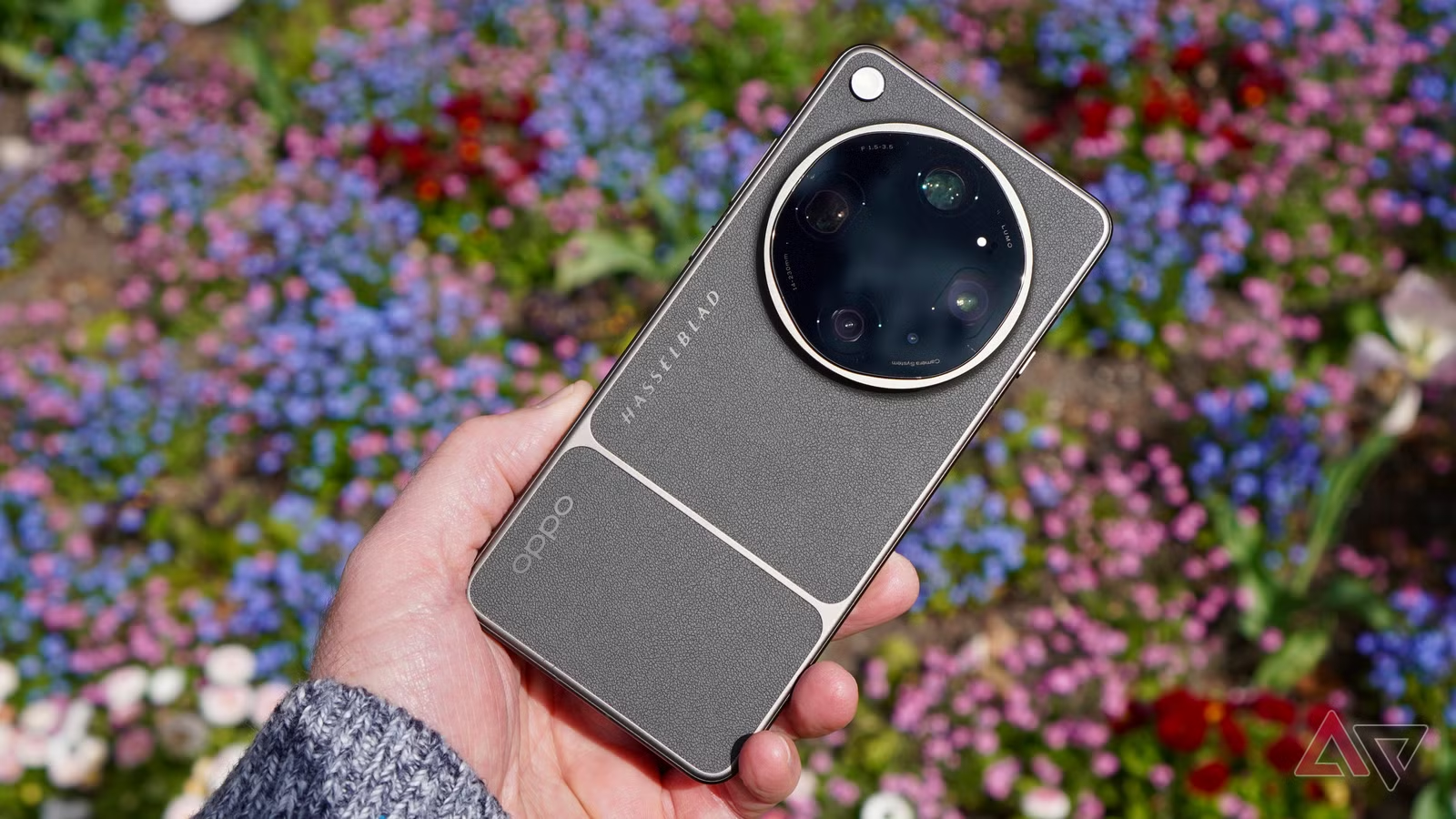
I’ve been using the Oppo Find X9 Ultra in its Tundra Umbra finish, and it’s really good-looking. It takes inspiration from Hasselblad camera design, and matches a gunmetal grey metal chassis with leather-look panels for a camera-like, and very cool overall look.
The phone is no lightweight, and the flat sides make it very substantial in your hand, but due to some sensible edge design, it’s not uncomfortable to grip for long periods. However, the camera module adds considerable weight, and it can feel top-heavy when held in portrait orientation.

On the side of the phone is a dedicated camera button, in Hasselblad orange to match the theme, and I love the tactile haptics when you press it. A double press opens the camera, it operates as the shutter release, and you can swipe across it to use the zoom. It’s responsive, and even if you do press it unintentionally, it doesn’t do anything unless you manage to press it twice.
There’s a second button, called the Snap Key, on the opposite side of the phone. This can be mapped to activate Oppo’s Mind Space AI feature, turn on the torch, activate the translation feature, and various other actions. You can also set it to do nothing when it’s pressed, and as I often pressed it by accident, this was my preferred choice.

An IP66, IP68, and IP69 dust and water resistance rating should keep it safe from spills, but I have managed to scratch the camera module’s glass cover. I haven’t treated the phone differently to any other, so was disappointed to see damage to it so quickly. Thankfully, it hasn’t impacted the camera’s functionality.
The Oppo Find X9 Ultra is a big bruiser of a phone. It’s not subtle, but its design is a winner, despite some small concerns over the durability of the glass over the cameras.
Oppo Find X9 Ultra camera
Absolutely fantastic photos

The reason why you’ll accept the Find X9 Ultra’s heft is the camera, and it’s well-worth the trade-off. It has a 200-megapixel, 1/1.12-inch Hasselblad main camera with a 2x in-sensor optical quality zoom, a 200MP, 1/1.1.28-inch telephoto for 3x optical zoom, a 50MP telephoto for 10x optical zoom and 20x optical quality zoom, and a 50MP wide-angle camera too.
It’s a technical powerhouse. The main camera is the largest 200MP camera sensor found in a phone yet, as is the 200MP telephoto camera. Oppo has used a quintuple prism reflection periscope structure to enable the 10x optical zoom to fit inside the module along with the rest of the tech.
There’s a True Color Camera and spectral sensor, which use 80% less power than previous versions, and Oppo’s Sensor Shift stabilization. Hasselblad has worked on the tuning, and supplies its Hasselblad Master Mode for the most natural colors and tone. Interestingly, Master Mode does not use any AI in its image creation.
The result is a versatile, feature-packed, but most importantly of all, really enjoyable camera. It has taken a while, but the partnership with Hasselblad is paying off, with photos full of life, color, and atmosphere.

There’s a photo in the gallery above of daffodils in the evening setting sun. The Find X9 Ultra captured the many flying insects, the glint of spider webs, and a wonderful depth of field at 3x zoom. It’s not the world’s best photo, but it’s absolutely representative of the atmosphere I saw with my own eyes, and aimed to capture. I love this.
The 10x optical zoom is an absolute joy, and I’m so pleased to see its return on a smartphone. Take a look at the 10x photo of the Starbucks Bearista in the gallery, and see how sharp the writing on the apron and tag are, and how little smoothing or edge enhancement is visible. Then do the same with the photo of the tulips, and just look at the depth of field possible with the 10x optical zoom.
Elsewhere in the camera app, there are filters to try out, and I’ve enjoyed the Bold B&W filter, which was ideal to capture the juxtaposition of street art on London’s Brick Lane, and high-rise buildings of the city in the distance.
The shutter release can take a moment too long to capture shots in some circumstances, but the Gallery has a comprehensive editing suite, the camera’s macro mode is superb, and AI tools like the reflection removal are effective. See the photo of the watch face below for an example of both macro performance and reflection removal.
Hype for the Oppo Find X9 Ultra’s camera is real. There are very few situations where it won’t take a good photo, and even fewer where you’ll be left wishing it was more capable. There’s so much to explore too, from the Hasselblad Master Mode to its extensive video capabilities, that you’ll be able to grow and improve with it over time.
It’s superb, and Samsung in particular should hang its head in shame for not making its own Ultra phone’s camera so compelling.
Oppo Find X9 Ultra Hasselblad Earth Explorer Kit
A very optional accessory

If the standard camera isn’t enough, you can buy the Hasselblad Earth Explorer Kit, which packages together a 300mm teleconverter lens, the required Explorer phone case, 67mm filter adapter, and brackets for a tripod.
The 300mm teleconverter is enormous, and everyone around you is going to notice you using it. It adds a 13x, 30x, and 60x zoom, along with settings for additional zoom lengths by tapping the 13x and 30x modes too. Oppo is open about using AI to enhance the 60x zoom, but you can turn it off if you prefer.

I’ve used the Oppo teleconverter immediately after using the Vivo teleconverters. Interestingly, Vivo’s implementation is far smoother. On the Find X9 Ultra, after you attach the lens to the Explorer case, you have to manually activate it in the More menu in the camera app. The lens shows up in your photos if you try to use the main camera with the lens attached.
It’s a bit of a mixed bag here, and after the extreme highs of the Find X9 Ultra’s main camera, occasionally a slight let down. There’s considerable processing at work when you shoot at 30x (which uses an in-sensor crop) and 60x, and it’s obvious when you crop the image down.
Yet, at 13x it can take beautiful, detail-packed photos. See the image of the yellow flower, which was taken from some distance away at 13x, and spot the insect on the petal. However, I’m pretty sure a similar photo could have been taken with the 10x camera, and this makes the Earth Explorer kit feel a bit optional.
Adding a filter to the Explorer case makes it versatile. I used a polarizing filter to take photos of fish in a shallow pond, and you can see in the comparison above how it removes reflections. There are circumstances where the Earth Explorer Kit will add plenty to the Find X9 Ultra, but it’s not as compelling as I thought it would be.
Oppo Find X9 Ultra software and performance
Great performance, software issues

The Find X9 Ultra has the Qualcomm Snapdragon Elite Gen 5 processor, a vapor chamber for cooling, and Android 16 with Color OS 16 installed. The 6.8-inch AMOLED screen has a 144Hz refresh rate, and is really bright with an 1800 nit full screen brightness. I’ve had no problem seeing it in sunlight.
ColorOS 16 shares plenty of design similarities and features with OnePlus’s OxygenOS. It’s colorful, and there’s plenty of customization, but it can frustrate. There are a lot of pre-installed apps (but none are intrusive), and I find what should be simple operations like changing the wallpaper needlessly menu-and-button intensive.

Unfortunately, notifications are broken on the Find X9 Ultra. Initially, notifications didn’t arrive at all, but things improved when I switched the phone to Performance mode, up from Balanced. Now, some notifications arrive, but most show up after I unlock the phone. It’s frustrating, and not a new issue on Android.
Switching to Performance Mode turned out to be a good thing. In Balanced Mode, the phone didn’t have the snap throughout the software I expect from such a high-power device, but this returned in Performance Mode. Scrolling through apps is lovely and smooth.

Oppo’s vapor chamber works hard when running intensive benchmarking apps, but the phone doesn’t overheat. Expect it to get warm to the touch when playing top games for a while, but not under normal circumstances.
For those with Mac computers or friends with iPhones, you can install the O+Connect app and share files, but it’s a bit of a fiddle. Not only does your friend need the app on their phone, but you also have to sign in to different accounts to share files wirelessly between the phone and a Mac. I found an email, or a USB C cable was far quicker and more reliable.
Oppo Find X9 Ultra battery and charging
Long-lasting, and fast to charge

Inside the Find X9 Ultra is a whopping 7,050mAh silicon-carbon battery, and I’ve consistently seen three days of general use (around three hours screen time per day) on a single charge. When I pushed the phone with use of the Earth Explorer Kit, navigation, and app use, the battery still lasts deep into the second day.
With light use, I can end the day with around 85% battery remaining, highlighting the software’s excellent efficiency. This has also been with Performance Mode active, as talked about above, so don’t be afraid to activate it due to concerns it’ll dramatically affect battery life. In my experience, it does not.
I ran a 20-minute 3DMark stress test to show how the phone would handle high-end gaming, and it took 14% from the battery, again suggesting good efficiency. A 30-minute YouTube video at 1440p over Wi-Fi took only 2%.
You can charge the phone using a 100W wired charger, or wirelessly at 50W. I’ve struggled to get good charging speeds so far. My Anker Prime charging block manages around 33W maximum, but will consistently dip to about 17W, making charging quite slow, despite the phone showing SuperVOOC proprietary standards are being met. Even using the USB A to USB C cable included with the phone, and the Smart Charging option related to it active in the Settings menu, hasn’t improved speeds.
Battery life is stellar, but the charging may be a pain if you don’t own a SuperVOOC proprietary charging block.
Should you buy the Oppo Find X9 Ultra?

Yes, the Oppo Find X9 Ultra is a fantastic purchase, provided you can stomach the cost. It’s as complete as the Samsung Galaxy S26 Ultra, and surpasses it in camera performance.
If you’ve never cared about the S Pen, and aren’t interested in an Apple iPhone 17 Pro Max, the Oppo Find X9 Ultra should be top of your list. The camera is far more engaging and varied than the Pixel 10 Pro XL’s too, and meets the challenge from the also fantastic Xiaomi 17 Ultra’s camera for capturing scenes as you see them, then adding a stunning twist thanks to effective collaborations with camera experts.

It’s let down by the software, which has some frustrating problems, but these can realistically be solved in a future update. Plus, previous experience has told me not everyone will see these issues arise. It’s also a big, heavy phone, even by modern standards.
Forget all about this, and just enjoy what is one of the most complete, exciting, desirable, and expensive flagship camera phones of the year.
8.5/10
- SoC
- Qualcomm Snapdragon 8 Elite Gen 5
- Display dimensions
- 6.82-inches
- Battery
- 7050mAh Silicon-Carbon
- Rear camera
- 200MP main / 50MP wide-angle / 200MP 3x optical telephoto / 50MP 10x optical telephoto
The Oppo Find X9 Ultra is one of the most expensive flagship phones available at the moment, but if photography is important to you, it’s hard to find a better phone. It’s joined by a lovely screen and a long-lasting battery. Just be prepared for some software issues, and a struggle to get the fastest charging speeds.
المصدر الأصلي: www.androidpolice.com

